
Hotdrop for Windows
Your Apex matches and gameplay highlights, captured while you play.
Hotdrop desktop installer
A Windows installer (.exe) for match tracking and gameplay capture on your PC.
Download for Windows (125 MB)v0.4.25 · Windows 10 or 11 · Apex on Steam or the EA app
Windows may warn on first run — choose More info → Run anyway.
What you’re installing
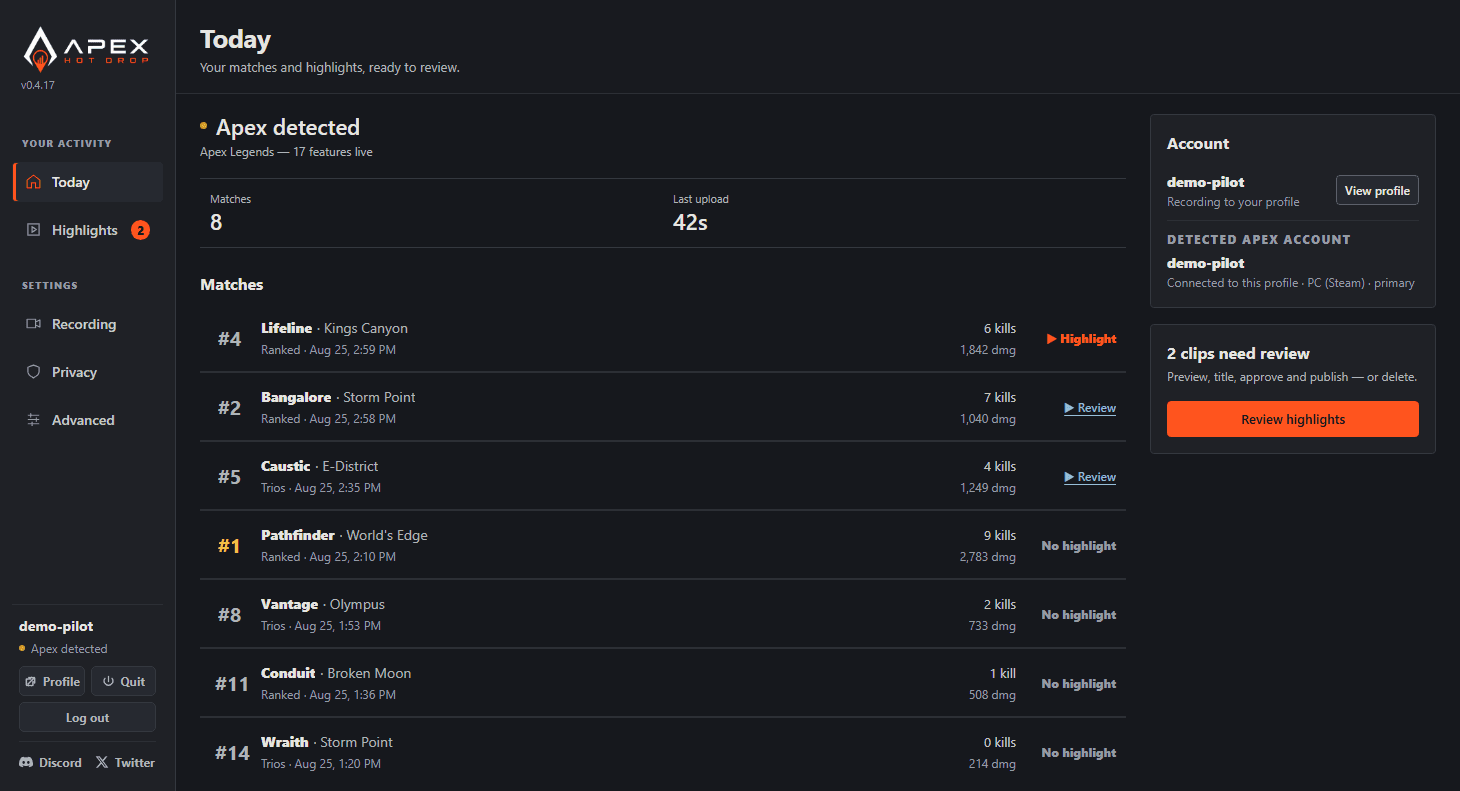
- Match tracking: capture Apex game events and review your matches on the website.
- Gameplay highlights: save clips on your PC, then review, trim, and choose which ones to publish.
- Automatic updates: new versions download in the background; restart Hotdrop when the update is ready.
Includes the Overwolf components Hotdrop uses to detect Apex and capture gameplay.
After installation
Open Hotdrop and log in with your email and password. An active subscription or trial unlocks recording. On a new install, gameplay recording is enabled by default and starts when Apex is detected. Clips stay on your PC until you approve publishing them.
Recording access
Recording requires an active plan or trial. View plans
Public profiles and match history are free to browse without an account.
Have a trial code?
Sign in to activate your trial.
No code? Ask in Discord.